GPU-as-a-Service (GPUaaS) is a cloud computing model that provides on-demand access to GPU compute over a network, billed by usage, without requiring organizations to purchase or maintain physical hardware. Instead of buying a GPU server, a team submits a request, receives access to a provisioned instance within minutes, and stops paying when the job is done.
The model emerged as a direct response to the economics of GPU hardware: significant up-front investment costs, high demand, and long procurement lead times. By converting the large capital commitment into an operational expense, GPUaaS helped make high-performance compute accessible to teams that could not justify the upfront investment.
But GPUaaS describes a procurement and billing model, not an architecture. The category has since evolved considerably, from raw GPU instance rental to full-stack AI infrastructure. This page traces that evolution, explains how a GPU cloud actually works, and covers what changed as AI workloads moved from experimentation to production at scale.
How the industry got here: from GPU rental to AI cloud
The beginning: GPU rental
Organizations running intermittent, compute-intensive workloads—like early model training, rendering, and scientific simulation—struggled to procure and maintain GPU hardware. Cloud providers began offering GPUaaS to let companies pay for GPU access by the hour, scale up when needed, and stop when done.
This model unlocked GPU access for thousands of teams that would have otherwise been priced out. It also created early commercial infrastructure—metered billing, instance types, and GPU-specific quotas—that many in the industry still use today.
The scale problem
As AI workloads grew in size and complexity, raw GPU access hit a ceiling. Modern workloads, such as training a large language model (LLM) or running inference, require full-stack infrastructure in order to run jobs efficiently across tens to hundreds of GPUs
Infrastructure elements included:
- High-performance networking connecting nodes for distributed workloads, such as InfiniBand fabric, which operates at 400 Gb/s (or higher with newer generations)
- Topology-aware job placement to ensure frequent GPU communication
- Fast shared storage that can deliver data at the rate GPUs can consume it
The once straightforward GPUaaS solution couldn’t keep up. Assembling all of this from generic cloud primitives is painful and produces inconsistent results.
As a result, GPU cloud providers emerged to bundle supporting infrastructure with the compute. But even a purpose-built GPU cloud still left gaps in the full stack.
Emergence of the AI cloud
Workloads continue to scale, placing high demands on GPU cloud platforms, many of which were retrofitted from general-purpose cloud infrastructure for compute-intensive workloads like AI. Organizations using GPU cloud services encountered cost, maintenance, and performance challenges that led them to seek GPUaaS in the first place.
The next evolution, the AI cloud, further integrated and specialized the infrastructure for these demanding workloads. An AI cloud is a platform where compute, networking, storage, and orchestration are designed together for AI workloads from the start, rather than assembled from general-purpose components. The result is not just better GPU access: it is a system where every layer is optimized for AI-specific patterns, from sequential high-throughput reads for training data to low-latency token generation for inference.
The evolution at a glance
Key terms and differentiations
GPUaaS has several related terms that are often used interchangeably, but they describe meaningfully different things. Here’s a snapshot of key terms and their definitions:
- GPUaaS (GPU-as-a-Service): a billing and access model in which GPU compute is delivered as a pay-per-use cloud service; it describes how you pay and how you access resources, not the quality or architecture of the underlying infrastructure
- GPU cloud: a broader product category of a cloud platform that offers GPU instances as a primary product
- AI cloud: a cloud platform designed from the ground up for AI workloads, in which every layer of the stack—compute, networking, storage, orchestration—is optimized together for training and inference at scale
- Neocloud: a newer class of cloud provider that specializes in GPU-heavy, AI, and HPC workloads; it does not guarantee that the infrastructure is optimized for AI at scale and integrated across the stack
- Hyperscaler: a large, general-purpose cloud platform—such as AWS, Google Cloud, OCI, and Azure—where GPU instances are one product among hundreds, typically layered on top of infrastructure built for diverse workloads
GPUaaS vs. GPU cloud
GPUaaS and GPU cloud are related but not the same thing. GPUaaS is a delivery and billing model that makes GPU compute available on demand and bills by usage. GPU cloud is a product category, a cloud platform where GPU instances are the primary offering.
Most GPU clouds offer their compute via a GPUaaS model, but the quality of what sits underneath varies enormously. A GPU cloud built on bare-metal servers with high-performance networking and topology-aware scheduling is a different product from a virtualized GPU instance on a general-purpose cloud, even if both are technically delivered as GPUaaS. When evaluating providers, the billing model is the least important variable. The infrastructure underneath is what determines whether the workload performs.
GPU cloud vs. AI cloud
A GPU cloud gives you GPU access. An AI cloud provides a system in which the GPU, the network connecting GPUs, the storage feeding data into training, and the orchestration managing workloads are all purpose-built for AI and designed to work together. The difference is most visible at scale: a GPU cloud can run AI workloads; an AI cloud is designed so that every layer supports them efficiently.
Neocloud vs. AI cloud
A neocloud is AI-specialized by orientation: it focuses on GPU and HPC workloads rather than offering a general-purpose cloud platform. An AI cloud is a further evolution that optimizes and integrates the full stack, beyond just the compute layer. All AI clouds in the specialist tier are neoclouds; not all neoclouds have built the full-stack integration that defines an AI cloud.
How GPUaaS works
At its core, GPUaaS works the same way any infrastructure-as-a-service model does. A provider deploys GPU-equipped servers in data centers, and customers access those servers over the internet. But the mechanics underneath—how instances are provisioned, how hardware is isolated between tenants, how networking and storage attach—vary significantly between providers and determine what workloads will actually run well.
The provisioning pipeline
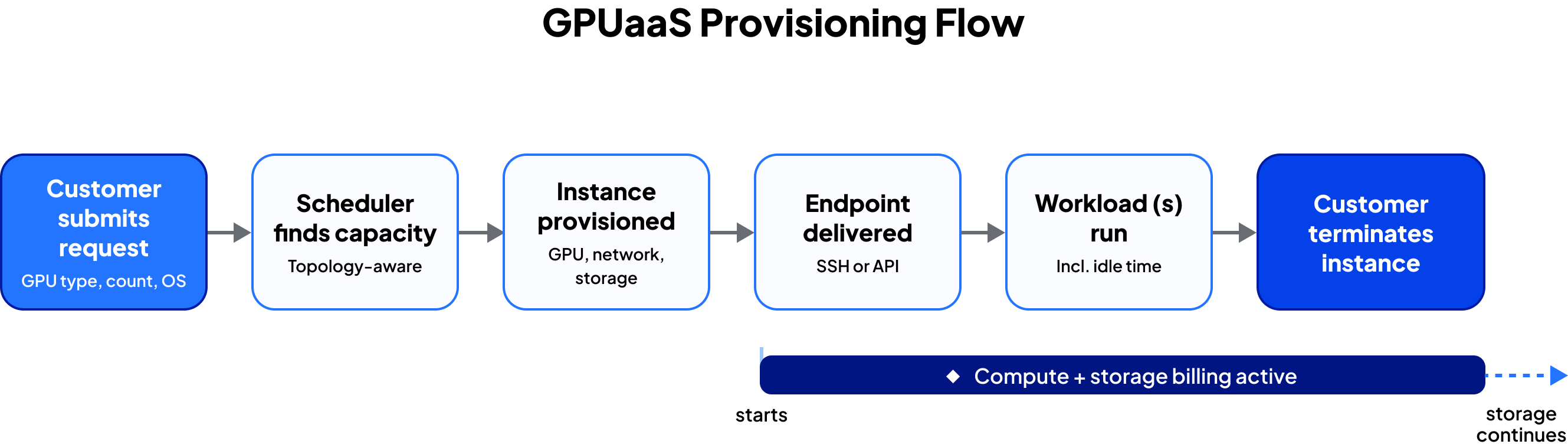
When a customer submits a GPU request, the following steps happen before the instance is ready:
- The platform's resource scheduler receives the request (specifying GPU type, count, operating system, and storage requirements) and queries available capacity.
- The provisioning layer allocates the hardware: binding GPUs to the tenant, configuring the network interface, and attaching storage volumes.
- The customer receives an access endpoint: SSH credentials for an interactive instance, a Kubernetes API endpoint for a managed cluster, or both.
The infrastructure impact: Purpose-built AI cloud infrastructure removes the hypervisor tax, so users get direct OS boot on the physical server with CUDA driver access and complete GPU memory allocation. Plus, the scheduler is topology-aware: it knows which nodes share a network switch and which GPU-to-GPU links are fastest, and places communicating nodes within the same network domain rather than scattering them across the fabric.
For on-demand instances, the full cycle from request to ready typically completes in under five minutes.
Tenant isolation
In a shared GPU cloud environment, multiple customers run workloads on the same physical infrastructure simultaneously. Isolation (preventing one tenant's workload from affecting another's performance, security, or data) is a core infrastructure requirement.
Hypervisors provide isolation by virtualizing the hardware, but they add overhead. Running this virtualization layer adds a CPU and memory tax, additional latency in GPU-to-memory and GPU-to-network paths, and constraints on low-level driver access required by some AI frameworks. Purpose-built AI cloud providers use alternative isolation mechanisms, such as data processing units (DPUs).
Access models
GPUaaS instances are accessed and managed in several ways depending on the provider and use case:
- SSH / bare metal shell: root access to a provisioned server in which customers manage their own software environment, suited for teams with existing MLOps tooling they want to run unchanged
- Kubernetes-native access: GPU instances provisioned as nodes in a managed cluster, with workloads submitted as pods or jobs—the preferred model for production inference and multi-step training pipelines
- API and framework integrations: workloads submitted and monitored programmatically via REST API or directly through distributed training frameworks like PyTorch DDP, DeepSpeed, or Megatron-LM.
- Slurm-on-Kubernetes: a popular integration that bridges HPC-style job submission with Kubernetes-native infrastructure for teams migrating from on-premise clusters
Benefits and limitations of GPUaaS
What GPUaaS enables
The foundational value of GPUaaS is access without ownership. For a wide range of workloads, that access model is the right fit.
What GPUaaS supports:
- Model experimentation and development: exploratory training runs, architecture experiments, and benchmarks that require less than 1 to 8 GPUs and typically run for hours rather than days
- Fine-tuning and short training runs: adapting an open-weight foundation model to a domain-specific dataset, typically requiring 8 to 64 GPUs for hours to a few days, without a standing GPU commitment
- Burst compute: handling jobs that exceed owned or reserved capacity, such as a large training run, a batch processing deadline, or a simulation that needs more nodes than the local cluster provides
- Eliminating procurement friction: time-to-first-GPU compressed from months to minutes, versus $200,000+ per 8-GPU node and 4 to 12 weeks of lead time for on-premise hardware.
- Early-stage teams: access to enterprise-grade GPU hardware without the capital or infrastructure expertise to own it, with the ability to scale up as workloads mature.
Where GPUaaS runs into limits
GPUaaS provides access to GPU compute. It does not guarantee that the surrounding infrastructure is optimized for demanding AI workloads:
- Multi-node distributed training: all-reduce collective operations that synchronize gradients across nodes saturate a standard Ethernet link; InfiniBand NDR fabric and topology-aware scheduling are required for large distributed jobs to stay efficient
- Production inference at scale: autoscaling, load balancing, queue management, and KV cache optimization must be assembled as a separate layer; raw GPU instances do not provide them
- Storage-intensive workloads: if storage I/O becomes the bottleneck, GPU utilization drops and training time stretches; generic cloud object storage was not designed for the high-throughput sequential read patterns large model training generates
- Performance consistency: shared or virtualized infrastructure introduces run-to-run variability; bare-metal access and dedicated infrastructure eliminate the variance for long training jobs where reproducibility matters
Delivery models for GPUaaS
GPUaaS is not a single commercial offer. Providers structure access in several ways, and the right model depends on how predictable and sustained the workload is.
On-demand instances
On-demand instances are billed by the hour (or per second on some platforms) with no upfront commitment. A customer provisions, runs a job, and terminates the instance; billing accrues only for active runtime. On-demand pricing carries the highest per-GPU-hour rate and often requires no minimum spend or term commitment.
On-demand instances suit variable workloads, especially for teams still learning their GPU utilization patterns: new training runs, model experimentation, short fine-tuning jobs, and burst capacity on top of a reserved baseline.
Reserved instances
Reserved instances commit a customer to a fixed GPU count for a defined term (typically one or three years) in exchange for a meaningfully lower per-hour rate. The discounts relative to on-demand pricing highly depend on the term length and provider.
Reserved capacity makes sense for stable, predictable workloads: production inference endpoints that run continuously, sustained training programs with a known hardware footprint, and organizations that have validated their infrastructure requirements and want cost predictability.
Spot instances
Spot instances offer access to unused capacity at a significant discount (greater than reserved instances) with the understanding that the provider can reclaim the instance with short notice when demand increases.
Spot instances suit batch workloads that can tolerate interruption: pre-training jobs with frequent checkpointing, non-time-critical data processing, and cost-sensitive experimentation. They are not appropriate for production inference or for any workload where interruptions cause significant downstream problems.
How most teams structure their usage
Mature AI teams typically run a combination:
- Reserved or dedicated instances for production inference serving and sustained training programs where utilization is consistently high
- On-demand or spot instances for new training jobs, experimentation, and burst capacity
This hybrid approach captures the cost efficiency of committed pricing for stable workloads while retaining flexibility for everything else.
How GPUaaS is offered today
Not all GPUaaS is created equal. While many teams focus on the billing model, what sits underneath the GPUaaS determines whether a workload actually performs and the overall utilization.
When evaluating providers, these are the factors that matter most:
- Bare metal vs. virtualized access: bare-metal instances give you direct CUDA access, full GPU memory bandwidth, and consistent run-to-run performance; virtualized instances add overhead that is most visible in large training jobs and latency-sensitive inference
- Network fabric: high-performance networking, like NVIDIA InfiniBand and RoCE, is required for efficient, multi-node distributed training; Ethernet creates a bottleneck when all-reduce operations need to synchronize gradients across hundreds of GPUs
- GPU generation availability: GPU availability varies significantly by provider, and a provider's access to current hardware reflects their infrastructure investment trajectory
- Pricing model flexibility: the ability to combine on-demand, reserved, and spot instances lets teams optimize cost across workload types rather than paying on-demand rates for everything
- Service level agreement (SLA) and support: best-effort availability is fine for experimentation; production inference and long training runs require uptime guarantees and prioritized incident response
Provider landscape
GPUaaS is offered across four distinct tiers. Hyperscalers, neoclouds, AI clouds, and community markets are all GPU clouds—they each deliver GPUaaS—but the infrastructure quality, integration depth, and workload fit vary considerably across tiers.
The right choice depends on how teams weigh the factors covered above: workload requirements, existing ecosystem integrations, and how much infrastructure management the team wants to own.
Hyperscalers (AWS, Google Cloud, Azure) offer GPU instances as part of a broad, general-purpose cloud platform where GPU compute is one product among hundreds. They suit teams already deeply integrated into a hyperscaler ecosystem or organizations where managed service integrations—such as databases, analytics, identity—matter as much as raw GPU performance.
Neoclouds focus on GPU-heavy workloads rather than offering a broad service catalog, typically at lower price points than hyperscalers. They are a practical option for teams looking for GPU-focused infrastructure without the cost premium of a major cloud provider, though infrastructure quality and SLAs vary significantly across providers in this tier.
AI clouds go further by integrating compute, networking, storage, and orchestration into a single platform purpose-built for AI workloads. They are best suited for teams running large-scale training, production inference, or any workload where the performance of the full stack impacts GPU performance and utilization.
Community and spot markets (RunPod, Vast.ai) aggregate capacity from many operators at the lowest available per-GPU-hour rates. There is no SLA, and performance consistency is not guaranteed, making them well suited for cost-sensitive experimentation and interruptible batch jobs rather than production workloads.