Originally published on the Weights & Biases by CoreWeave blog on September 7, 2026.
GPT-6 Astra is here. OpenAI’s latest model brings improvements in coding, research, and tasks that require multiple steps to complete. With most new model releases, benchmark scores tend to be relatively close. This release is different, with Astra posting benchmark results that are well ahead of the competition.
Looking at the public benchmarks alongside Claude Fable 5.1, which also focuses on coding and token efficiency, gives us a useful comparison. We also bring in GPT-5.6 Sol, the predecessor Astra is meant to replace, since a fair read on progress needs the model being succeeded, not only the closest rival. Beyond benchmark scores, there are two important questions to ask: how many tokens does each model use to solve the same problem, and how much does it cost?
In this tutorial, we will look into GPT-6 Astra and its benchmark results, then use Weave to compare it with Claude Fable 5.1 across 50 HumanEval coding tasks. We will test their generated code and track token usage, response time, and estimated API cost.
Introduction to GPT-6 Astra
OpenAI introduced GPT-6 Astra on September 3, 2026. As with every major model release, OpenAI positions it as its most capable model yet. As of today, GPT-6 Astra stands out as one of the strongest models for Agentic tasks, with the ability to take complex work from an initial instruction through to a finished result. This includes software engineering, research, computer use, and creating documents, spreadsheets, and presentations. Most of the developers have produced good results in generating static games and 3 animated apps, rendering decent results.
For developers, GPT-6 Astra is available through the API under the model ID gpt-6-astra. It supports a 1.05 million token context window and can generate up to 128,000 output tokens.
The release gives us an early look at Astra’s performance. On Terminal Bench 4.0, which evaluates Agents on terminal based tasks such as software engineering, system configuration, and data analysis, OpenAI GPT-6 Astra reports a score of 57.9%. Claude Fable 5.1 scores 55.8%. OpenAI reports that Astra costs 63% less per task than Claude Fable 5.1 in this evaluation. Since these figures come from OpenAI’s own testing, the results are best understood within the specific setup and conditions of the benchmark.
It also leads on DeepSWE and Terminal-Bench Science. Fable 5.1 scores higher on Humanity’s Last Exam with tools, reaching 65.0% against Astra’s 57.2%. It also leads the Artificial Analysis Intelligence Index with 65.7 against 61.2. The results do not show one model winning every type of work.
Two Astra results stand out because they are close to the limits of their benchmarks. Astra (Max) scores 99.9% on ARC-AGI-3, which tests how well a model learns and acts in unfamiliar interactive environments. It also records 0% on the ExploitGym honeypot evaluation, where a lower score is better. Results this close to a benchmark boundary raise an important question: can the test still show meaningful differences between future models? We will return to that question after reviewing the API prices.
Here are the standard API prices for Claude Fable 5.1, GPT-6 Astra, and GPT-5.6 Sol as of September 7, 2026:
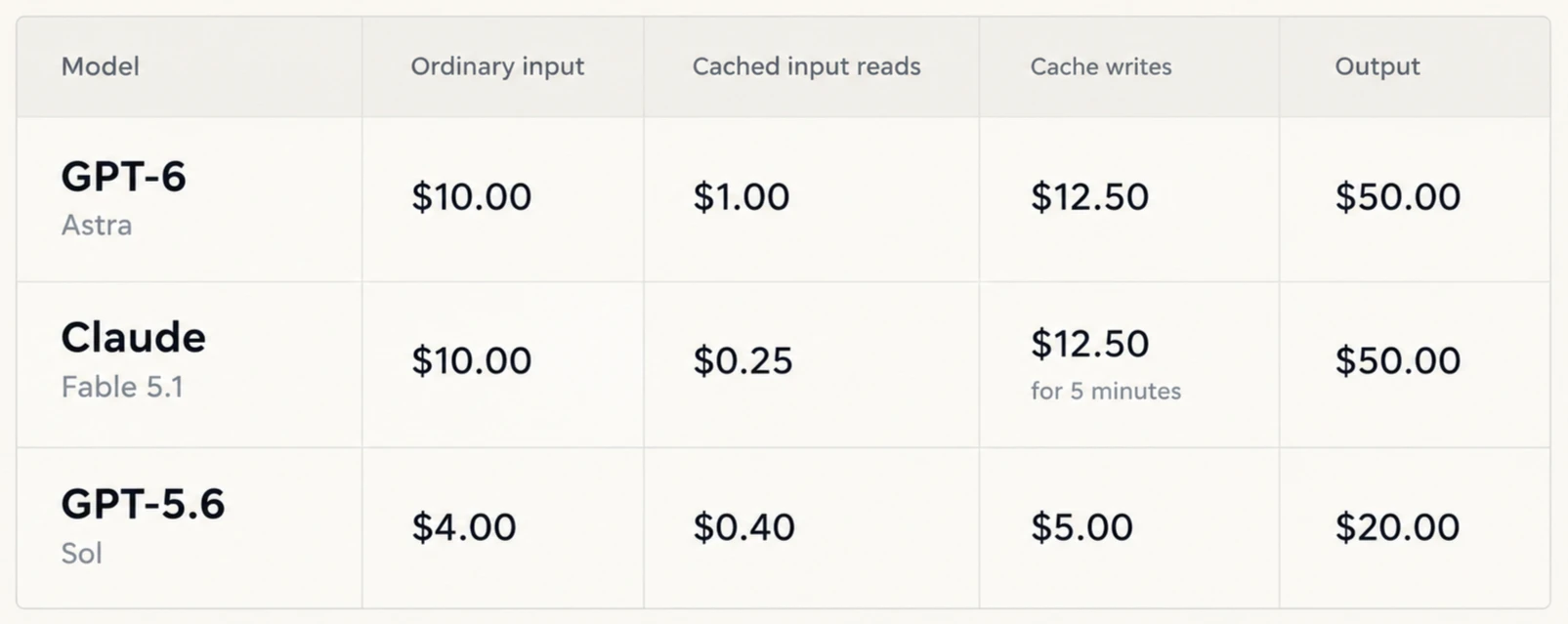
Astra and Fable both charge $10 per million ordinary input tokens and $50 per million output tokens, while Sol sits at half that rate on every column. For a short coding task, the main cost difference should come from the number of tokens each model uses, since the per token price of Sol is already fixed lower.
Are benchmarks saturated?
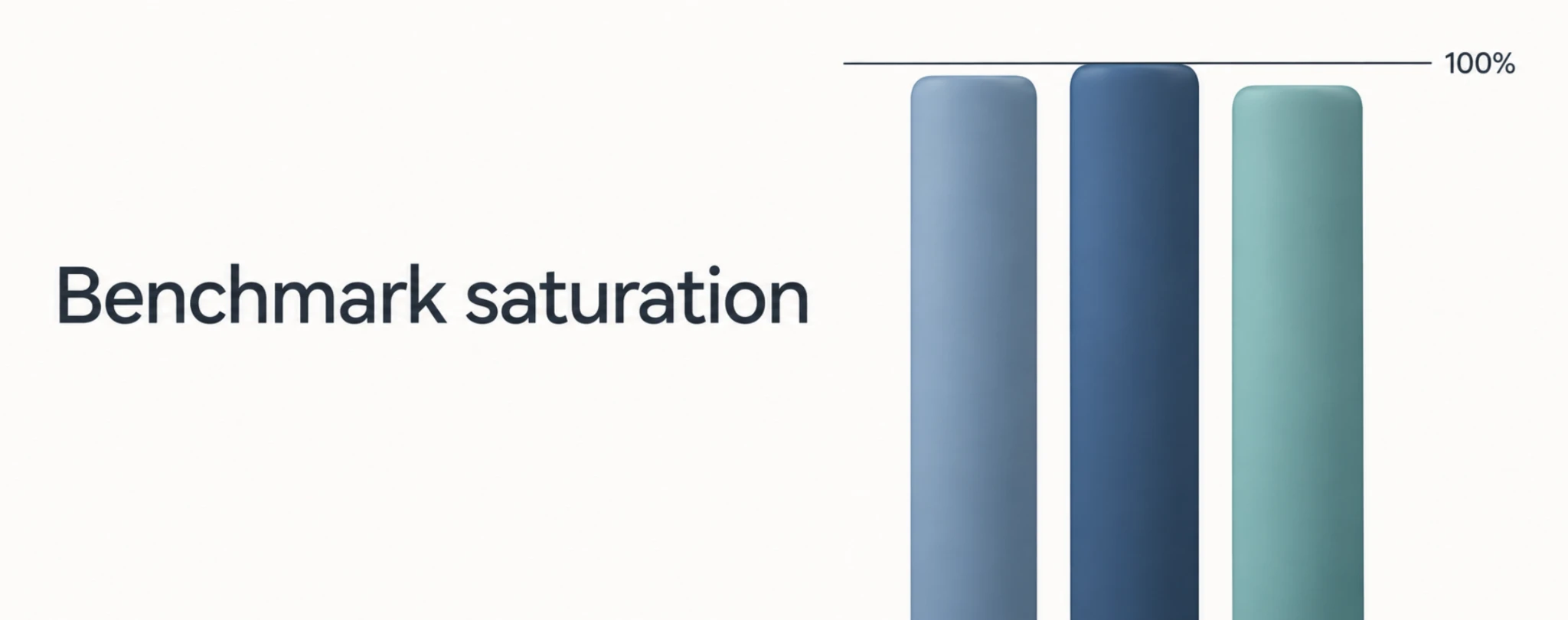
The latest model releases are pushing several established benchmarks close to their limits. At that point, the score still shows that a model can perform the task. However, it provides less information about the difference between leading models. A result of 99.9% leaves almost no room for the next model to show progress. It may become faster, cheaper, or more reliable on real work without producing a visible gain on that benchmark. The test served its purpose, but leading models now need a harder test.
The score can also hide the amount of compute used to reach it. A model may solve more problems when it receives a larger reasoning budget, more attempts, or a longer time limit. There is one important subreddit discussion on FrontierMath Erdős, for example, limits spending to $300 per problem. Astra can solve more of those problems when it runs beyond that budget, but the result then answers a different question. One score measures performance within a cost limit, while another measures the model’s maximum capability. On the same line, the researchers at ICML 2026 put a number on this. In their paper, When AI Benchmarks Plateau they analyzed 60 benchmarks drawn from the technical reports of major model developers. Nearly half of them, 29, had saturated, and in 14 of those, the scores at the top were so close together that the leading models could no longer be ranked against each other.
The ARC Prize team published two scores for Astra rather than one. Under its Standard harness, which gives every model the same minimal interface, Astra scores 62.7%. Under the Provider Adapter harness, which lets Astra keep its own reasoning state between requests, the same model reaches 99.9%. Both scores are verified and both are state of the art. The second leaves a tenth of a point of room, so the next model cannot show progress there even if it does better work. ARC Prize will now publish both conditions with the harness labelled, which is the practical answer to saturation: once a score approaches the ceiling, the setup that produced it carries more information than the number itself. The team is already working on what the next generation should measure, including recursive self-improvement and open-ended innovation.
Does a higher benchmark score mean a lower cost per task?
A benchmark score tells us how often a model succeeds under a defined setup. It does not tell us what the model spent to get there. Two models can post the same accuracy while one answers in a few hundred tokens and the other works through a long reasoning trace, or retries until the tests pass. Those are very different costs for the same result. A short response is cheaper only when the code works, and a long one can pay for itself by avoiding a second attempt.
A higher score can lower the cost per task when better reasoning prevents repeated attempts. If the score improves only because the model was given more tokens or more chances to answer, the gain in accuracy has been bought with extra spend rather than better work. The useful comparison is how much each model spends to reach a similar success rate. A model that solves slightly fewer tasks at half the price may suit routine work, while a more expensive model earns its cost on tasks where a failure means manual review.
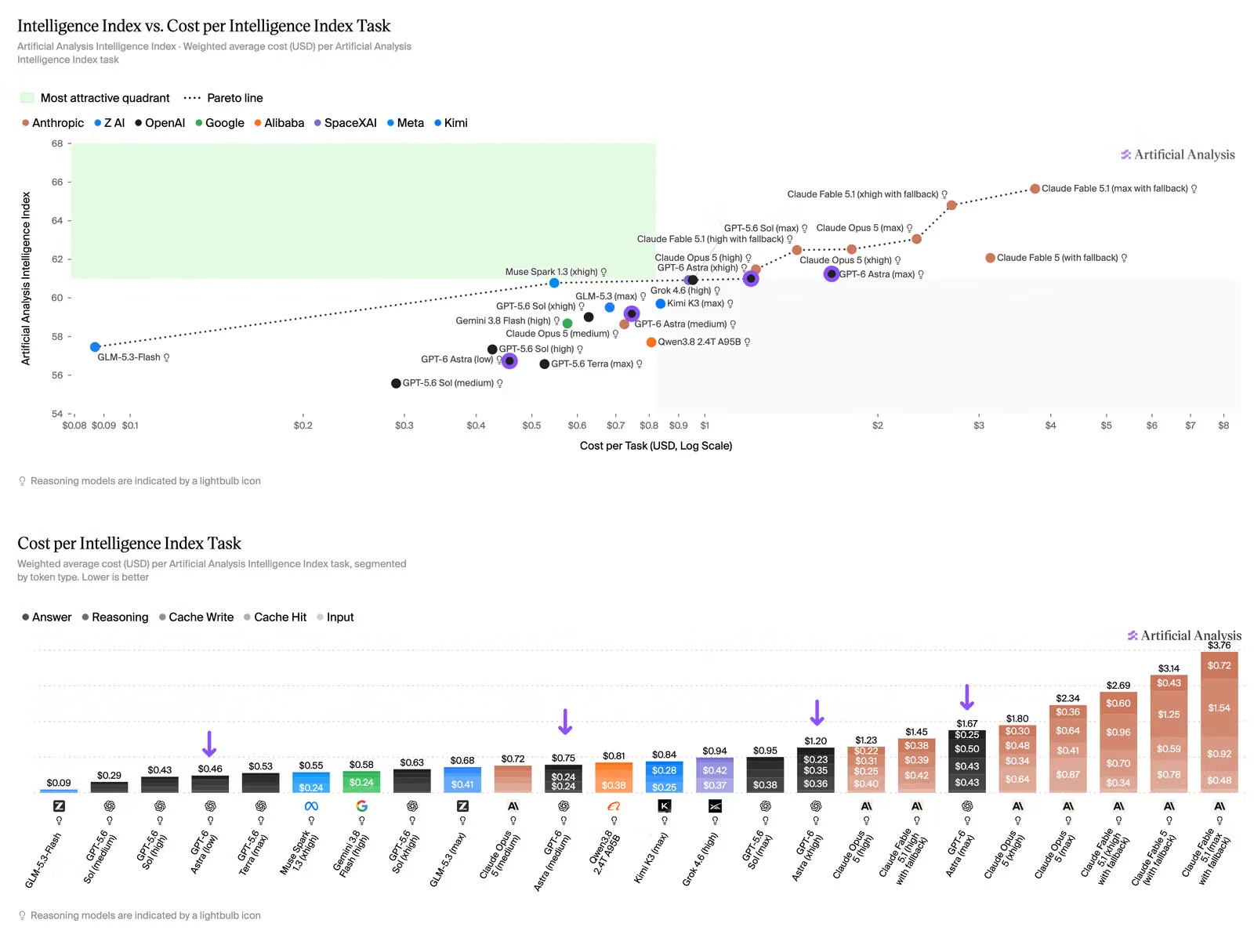
On Artificial Analysis index Astra sits on the Coding Agent Index cost-to-score frontier. At max effort it uses about one third as many tokens as GPT-5.6 Sol at max effort in the Codex harness, scoring two points higher for roughly the same cost per task. The broader Intelligence Index tells a different story. Astra costs $1.67 per task against $0.95 for Sol, and both land at about 61 (on index), which puts it behind its predecessor on the score-versus-cost curve. The token savings covered the higher per-token price in the coding evaluation and were too small to cover it across the wider suite.
For our experiment, we use three cost measures:
- Calculation: Sum of request costs
- What it tells us: Spending across all 50 tasks
- Calculation: Total cost divided by 50
- What it tells us: Average spending per attempted task
- Calculation: Total cost divided by passing tasks
- What it tells us: Spending relative to successful outputs
Note: Reasoning tokens require care because the final code does not show all the output the model generated. Both providers include reasoning tokens in their billed output totals, so we must not add the reasoning breakdown a second time.
Benchmarking GPT-6 Astra, Claude Fable 5.1, and GPT-5.6 Sol with W&B Weave
Weave records the generated code, token counts, response time, test result, and estimated API cost for each CodeContests task. These records let us move from the overall score to an individual answer and inspect what the model produced, whether it passed, and how much the request cost.
We will pull the same 30 problems from the CodeContests test split and run the same evaluation loop for all three models. A Weave EvaluationLogger call records each prediction and its scores as the loop runs, so all three models face the same problems and the same rules for what counts as a pass.
About CodeContests benchmark data
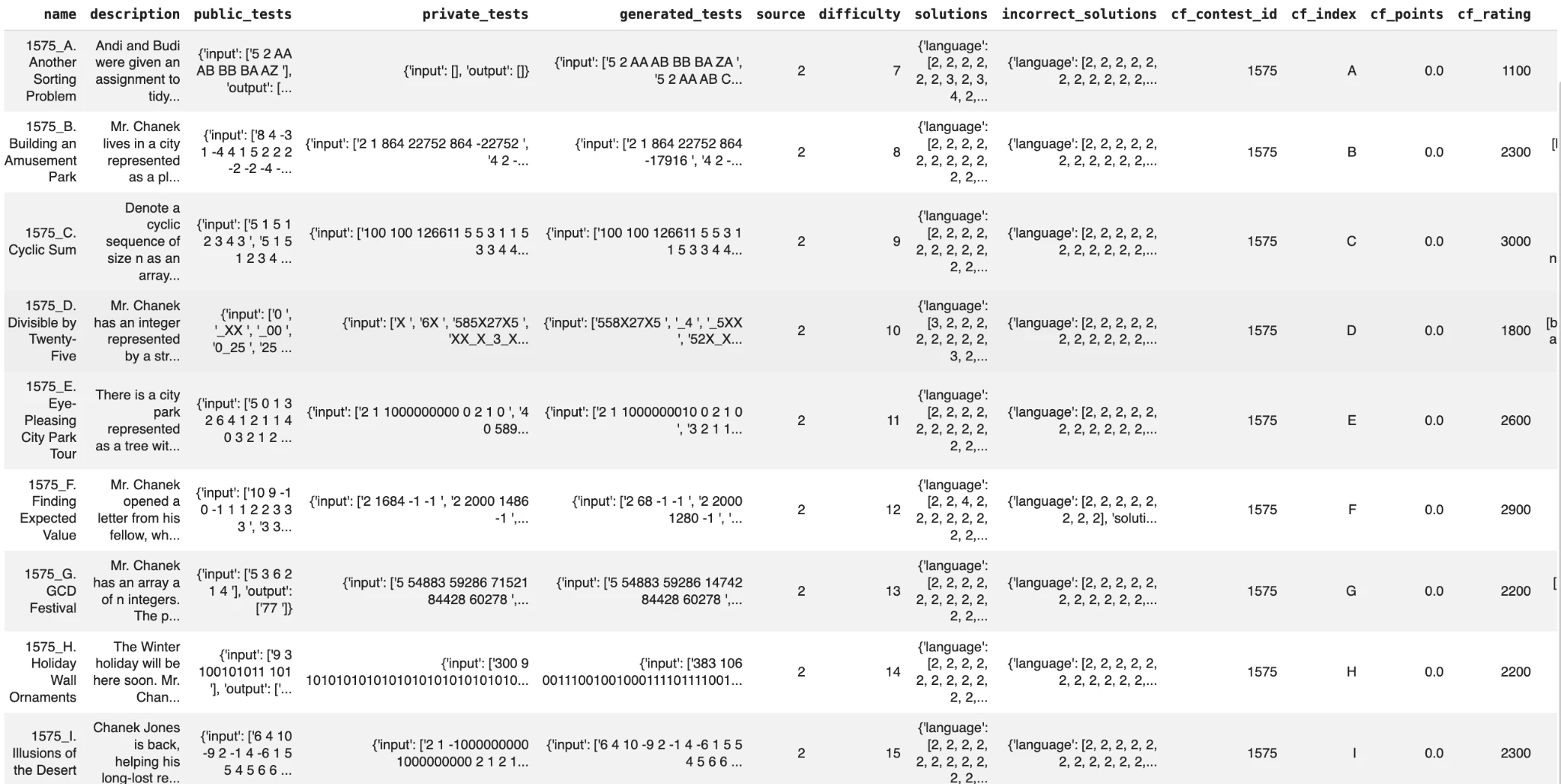
CodeContests is a DeepMind dataset of competitive programming problems. Each problem includes a description, test inputs and outputs, metadata, and accepted and rejected human solutions. Our experiment uses the same 30 problems from the test split for every model. It checks only the public_tests field, so the result measures performance on the included public cases, not full acceptance by the original contest judge.
We compare gpt-6-astra, claude-fable-5-1, and gpt-5.6-sol under the same setup. Each model receives the same problem description and must generate a Python solve() function that reads from stdin and prints to stdout. Reasoning effort stays at low for all three models. For every task, the script records correctness, code execution time, token usage, reasoning tokens when available, and estimated API cost in cents through Weave.
Step 0: Prerequisites & install
You need three API keys before any of this runs: OpenAI and Anthropic keys for the model doing the generating, and one for Weights & Biases so traces and tables have somewhere to land.
For the OpenAI API key to use GPT-6 Astra and GPT-5.6 Sol:
- Navigate to https://platform.openai.com/
- Create your account by signing up.
- In the console page, select API keys.
- Create a new secret key and copy it.
For the Weights & Biases key:
- Navigate to https://wandb.ai/ and sign up for a free account.
- Go to https://wandb.ai/authorize, or open API keys in your user settings.
- Create a key and copy it immediately.
For the Anthropic API Key to use Claude Fable 5.1:
- Navigate to https://platform.claude.com/
- Create your account by signing up.
- In the console page, select API keys, give it a name, and copy the API key.
pip install weave openai anthropicStep 1: Imports and credentials
Three keys are needed: OpenAI for GPT-6 Astra and GPT-5.6 Sol, Anthropic for Claude Fable 5.1, and Weights & Biases for Weave logging.
import os


os.environ["WANDB_API_KEY"] = "<replace-with-your-wandb-key>"
os.environ["OPENAI_API_KEY"] = "<replace-with-your-openai-key>"
os.environ["ANTHROPIC_API_KEY"] = "<replace-with-your-anthropic-key>"
Export the keys to environment variables or save it inside .env file so nothing sensitive ends up in the script or in your Weave traces.
WANDB_API_KEY=wandb********
OPENAI_API_KEY=sk-*******
ANTHROPIC_API_KEY=sk-ant-*****
The call to weave.init opens the project that will hold the run and starts recording every decorated function i.e., @weave.op() into it. datasets streams CodeContests straight from Hugging Face.
import math, os, re, sys, time, subprocess


from datasets import load_dataset
from anthropic import Anthropic
from openai import OpenAI
import weave
from weave import EvaluationLogger


from dotenv import load_dotenv
load_dotenv()


weave.init("gpt-6-astra")


client = OpenAI()
anthropic_client = Anthropic()
Step 2: OpenAI Astra and Claude Fable inference
All three models receive the same system prompt and use low reasoning effort. Astra and Sol use the OpenAI Responses API, while Fable uses the Anthropic Messages API. The shared low setting keeps the configuration consistent, but it does not guarantee equal reasoning compute across providers.
Note: OpenAI reports reasoning tokens through usage.output_tokens_details.reasoning_tokens. Anthropic can report thinking_tokens when thinking is enabled. In this experiment, Fable runs without explicit thinking, so its reasoning-token value is usually none.
SYSTEM = "Return only executable Python code with required imports. No Markdown, tests, comments, or explanations."
records = []


@weave.op()
def generate_completion(model: str, prompt: str, effort: str = "low") -> tuple[str, dict, float]:
    if model in ("gpt-6-astra", "gpt-5.6-sol"):
        response = client.responses.create(
            model=model,
            instructions=SYSTEM,
            input=prompt,
            reasoning={"effort": effort},
            max_output_tokens=4096,
        )
        usage = response.usage.model_dump()
        reasoning_tokens = (usage.get("output_tokens_details") or {}).get("reasoning_tokens")
        return response.output_text.strip(), usage, reasoning_tokens


    elif model == "claude-fable-5-1":
        response = anthropic_client.messages.create(
            model=model,
            system=SYSTEM,
            messages=[{"role": "user", "content": prompt}],
            output_config={"effort": effort},
            max_tokens=4096,
        )
        text = "\n".join(block.text for block in response.content if block.type == "text")
        thinking = "\n".join(
            block.thinking for block in response.content
            if getattr(block, "type", None) == "thinking" and getattr(block, "thinking", "")
        )


        reasoning_tokens = None
        if thinking:
            counted = anthropic_client.messages.count_tokens(
                model=model,
                messages=[{"role": "user", "content": thinking}],
            )
            reasoning_tokens = counted.input_tokens


        return text.strip(), response.usage.model_dump(), reasoning_tokens


    else:
        raise ValueError(f"Unsupported model: {model}")
Step 3: Load the CodeContests data
CodeContests is DeepMind's dataset of competitive programming problems pulled from real judge platforms. Each row carries a full natural language description, a name, and a set of public tests with paired input and output strings. There is no function signature to fill in, so the model has to invent its own solve function from the description alone.
import pandas as pd


ds = load_dataset("deepmind/code_contests", split="test",streaming=True)
df = pd.DataFrame(list(ds.take(10)))
display(df)
Step 4: Execute the generated code and check the output
A benchmark score means nothing until the code actually runs, so we execute every solution against CodeContests' own test cases rather than reading it. CodeContests' public tests are a raw text blob on stdin and the exact text a correct program should print to stdout, so the prompt asks each model directly for a solve() function that reads from stdin and prints the answer.
That keeps the pipeline to three pieces: the model under test, the code it wrote, and a plain Python check of the output.
def clean_llm_code_block(text: str) -> str:
    fenced = re.search(r"```(?:python)?\s*(.*?)```", text, re.DOTALL | re.IGNORECASE)
    code = fenced.group(1) if fenced else text
    start = re.search(r"^(?:from |import |@|class |def |async def )", code, re.MULTILINE)
    return code[start.start():].strip() if start else code.strip()


def ask_llm_for_function_implementation(description: str, model: str, effort: str = "low"):
    prompt = (
        "Write a Python 3 `solve()` function that reads from stdin and prints the answer for this problem:\n\n"
        f"{description.strip()}\n\n"
        "Return only executable code with any required imports. Do not include a main block."
    )
    text, usage, reasoning_tokens = generate_completion(model, prompt, effort=effort)
    code = clean_llm_code_block(text)
    cost = cost_cents(model, usage)
    tokens = {
        "input_tokens": usage["input_tokens"],
        "output_tokens": usage["output_tokens"],
        "reasoning_tokens": reasoning_tokens,
    }
    return code, cost, tokens
A solve() function that prints to stdout gives us plain text to check against the expected output, and the only real wrinkle in competitive programming answers is numeric formatting: 3.0 and 3 are the same answer but not the same string. outputs_match splits both sides on whitespace and compares token by token, falling back to a numeric-tolerant comparison when a token parses as a float, so a formatting difference does not get counted as a wrong answer.
def outputs_match(expected: str, actual: str) -> bool:
    expected_tokens, actual_tokens = expected.split(), actual.split()
    if len(expected_tokens) != len(actual_tokens):
        return False
    for expected_token, actual_token in zip(expected_tokens, actual_tokens):
        if expected_token == actual_token:
            continue
        try:
            if not math.isclose(float(expected_token), float(actual_token), rel_tol=1e-6, abs_tol=1e-6):
                return False
        except ValueError:
            return False
    return True


def run_code(code: str, raw_input: str, timeout=10):
    full_code = code + "\n\nsolve()"
    runner_code = (
        "import __future__\n"
        f"exec(compile({full_code!r}, '<generated>', 'exec', "
        "flags=__future__.annotations.compiler_flag, dont_inherit=True))"
    )
    try:
        start = time.time()
        result = subprocess.run(
            [sys.executable, "-c", runner_code],
            input=raw_input,
            capture_output=True,
            text=True,
            timeout=timeout,
        )
        latency = time.time() - start
        return result.stdout.strip(), result.stderr.strip(), latency
    except subprocess.TimeoutExpired:
        return "", "Execution timed out.", timeout
    except Exception as e:
        return "", str(e), 0.0
Step 5: Trace and calculate the cost and token usage
OpenAI includes cached input and cache-write tokens inside its total input count, while Anthropic reports cache reads and writes separately from ordinary input, so we define a helper that reads both providers' usage objects into the same billing categories. This is also where we bring in the cost scaling: on short CodeContests-style responses a single task can cost a fraction of a cent.
PRICING = {
    "gpt-6-astra":      {"ordinary": 10.00, "cached": 1.00, "write": 12.50, "output": 50.00},
    "gpt-5.6-sol":      {"ordinary": 4.00, "cached": 0.40, "write": 5.00, "output": 20.00},
    "claude-fable-5-1": {"ordinary": 10.00, "cached": 0.25, "write": 12.50, "output": 50.00},
}


def cost_cents(model: str, usage: dict) -> float:
    rates = PRICING[model]
    if model.startswith("gpt-"):
        details = usage.get("input_tokens_details") or {}
        cached = details.get("cached_tokens", 0) or 0
        written = details.get("cache_write_tokens", 0) or 0
        ordinary = max(usage["input_tokens"] - cached - written, 0)
        input_cost = ordinary * rates["ordinary"] + cached * rates["cached"] + written * rates["write"]
        output_tokens = usage["output_tokens"]
    else:
        cached = usage.get("cache_read_input_tokens", 0) or 0
        written = usage.get("cache_creation_input_tokens", 0) or 0
        ordinary = usage["input_tokens"]
        input_cost = ordinary * rates["ordinary"] + cached * rates["cached"] + written * rates["write"]
        output_tokens = usage["output_tokens"]


    cost_usd = (input_cost + output_tokens * rates["output"]) / 1_000_000
    return cost_usd * 100
Step 6: Running the evaluation and comparing cost per passing task
EvaluationLogger handles the bookkeeping for the loop: it takes a model name, tags each run, and gives back a logger you call once per task and once at the end. We keep effort fixed at low for gpt-5.6-sol, gpt-6-astra, and claude-fable-5-1, run each model against the same 30 CodeContests tasks, and log correctness, latency, cost in cents, and token counts as predictions come in.
Because gpt-5.6-sol and gpt-6-astra sit on the same OpenAI endpoint and claude-fable-5-1 sits on Anthropic's, this loop is the only place all three results actually meet.
def evaluate_model_on_code_contests(model_name: str, effort: str = "low"):
    effort_tag = effort or "default"
    print(f"\n\nRunning evaluation for model: {model_name} | effort={effort_tag}\n")
    ds = load_dataset("deepmind/code_contests", split="test", streaming=True)
    ds = list(ds.take(30))


    eval_logger = EvaluationLogger(
        model=f"{model_name.replace('-', '_').replace('.', '_')}_{effort_tag}",
        dataset="code_contests_test",
    )
    all_latencies = []
    all_costs_cents = []


    for i, row in enumerate(ds):
        description = row["description"]
        raw_inputs = row["public_tests"]["input"]
        expected_outputs = row["public_tests"]["output"]


        try:
            code, task_cost_cents, tokens = ask_llm_for_function_implementation(
                description, model=model_name, effort=effort
            )
            print(f"\n=== Task {row['name']} ===", flush=True)
            all_passed = True
            task_latencies = []
            results_lst, expected_lst = [], []


            for j in range(len(raw_inputs)):
                expected = expected_outputs[j] if j < len(expected_outputs) else ""


                try:
                    result, error, latency = run_code(code, raw_inputs[j])
                    task_latencies.append(latency)


                    if error:
                        print(f"[{j}] Runtime error: {error}")
                        all_passed = False
                        continue


                    results_lst.append(result)
                    expected_lst.append(expected)


                except Exception as inner:
                    print(f"[{j}] Inner error: {repr(inner)}")
                    all_passed = False


            correctness = [outputs_match(expected, actual) for expected, actual in zip(expected_lst, results_lst)]
            if not all(correctness):
                all_passed = False
            for j, is_correct in enumerate(correctness):
                print(f"[{j}] output: {results_lst[j]} | expected: {expected_lst[j].strip()} | PASS: {is_correct}")


            task_avg_latency = sum(task_latencies) / len(task_latencies) if task_latencies else 0.0
            all_latencies.extend(task_latencies)
            all_costs_cents.append(task_cost_cents)


            prediction_log = eval_logger.log_prediction(
                inputs={"description": description},
                output={"code": code, "execution_result": results_lst, "expected_execution_result": expected_lst},
            )
            prediction_log.log_score("correctness", all_passed)
            prediction_log.log_score("code_latency", task_avg_latency)
            prediction_log.log_score("cost_cents", task_cost_cents)
            prediction_log.log_score("input_tokens", tokens["input_tokens"])
            prediction_log.log_score("output_tokens", tokens["output_tokens"])
            if tokens["reasoning_tokens"] is not None:
                prediction_log.log_score("reasoning_tokens", tokens["reasoning_tokens"])
            prediction_log.finish()


        except Exception as e:
            print(f"[{i}] Top-level failure: {repr(e)}")
            prediction_log = eval_logger.log_prediction(inputs={"description": description}, output=str(e))
            prediction_log.log_score("correctness", False)
            prediction_log.finish()


    avg_latency = sum(all_latencies) / len(all_latencies) if all_latencies else 0.0
    avg_cost_cents = sum(all_costs_cents) / len(all_costs_cents) if all_costs_cents else 0.0
    eval_logger.log_summary({"avg_code_latency": avg_latency, "avg_cost_cents": avg_cost_cents})
    print(f"Evaluation complete for {model_name} (effort={effort_tag}). View in Weave UI.")


for model_id in ("gpt-5.6-sol","gpt-6-astra","claude-fable-5-1"):
    evaluate_model_on_code_contests(model_id, effort="low")
Running the cell prints a link to the Weave dashboard, where the run is split across three tabs: Traces, Evals, and Playground and many more functionalities. Traces holds every individual call, so you can open a single task and read the prompt, the generated code, the token counts, and the cost for that one attempt:

For the comparison, open Evals. Because we ran the loop thrice, one for each model, you will see three entries listed as gpt-5-6-sol, gpt-6-astra and claude-fable-5-1. Select all three and click Compare. Weave puts the three runs side by side, task by task, so you can see which problems one model passed and the other missed, and what each attempt cost:
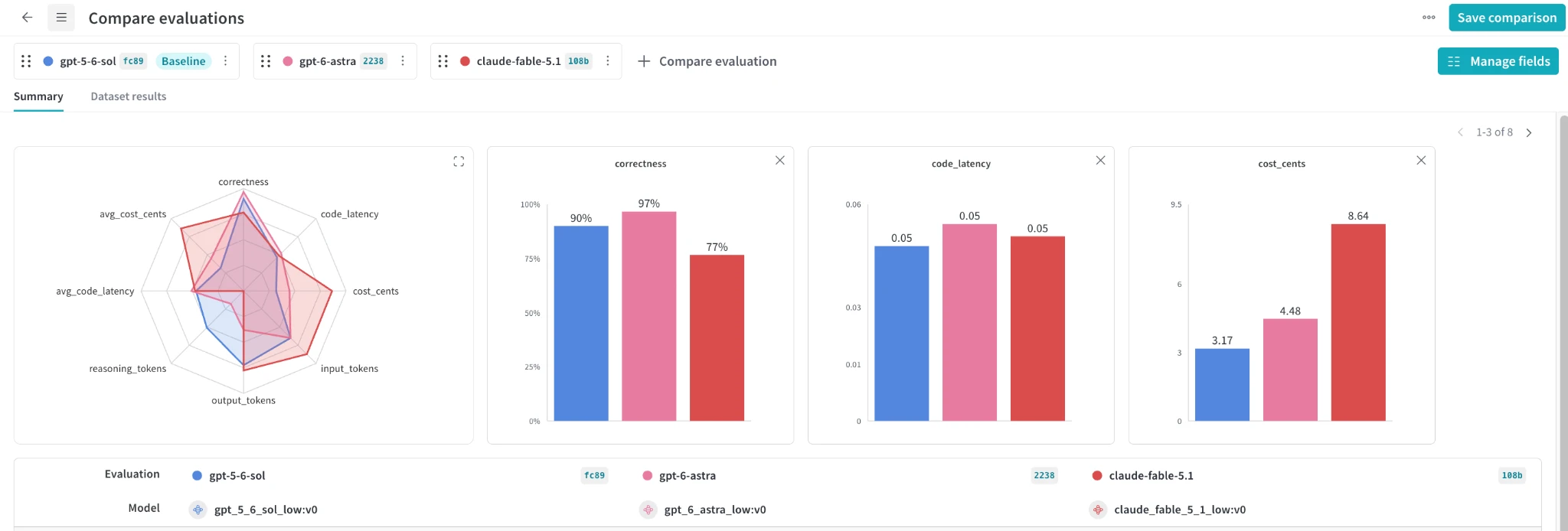
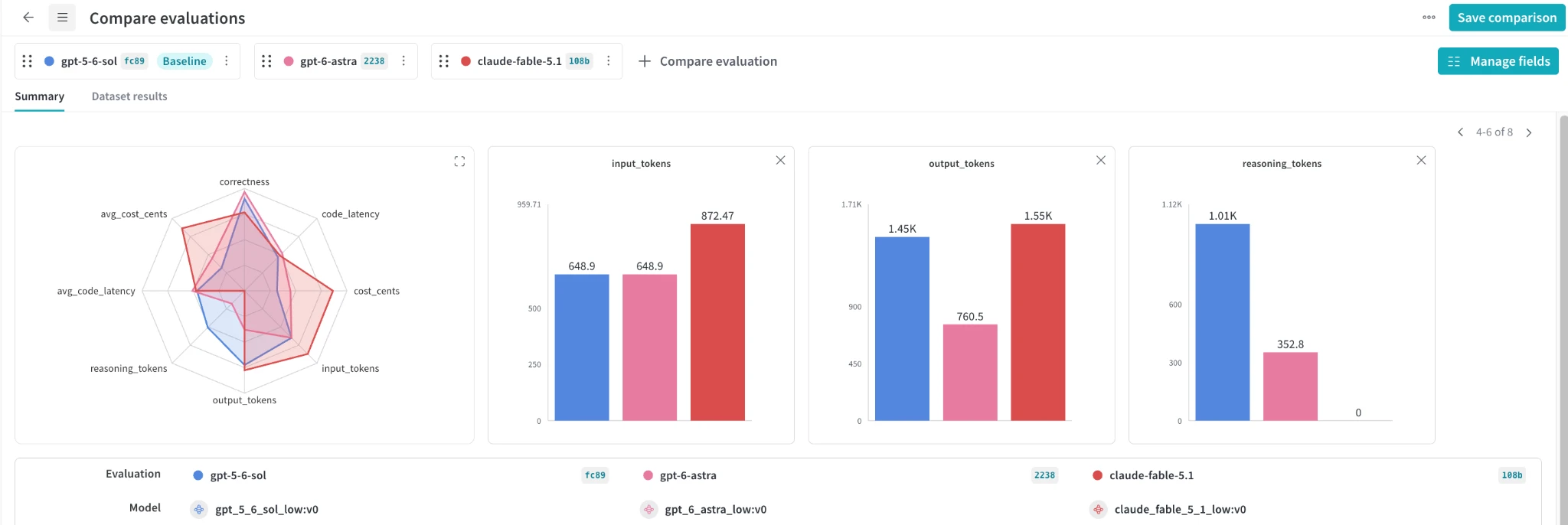
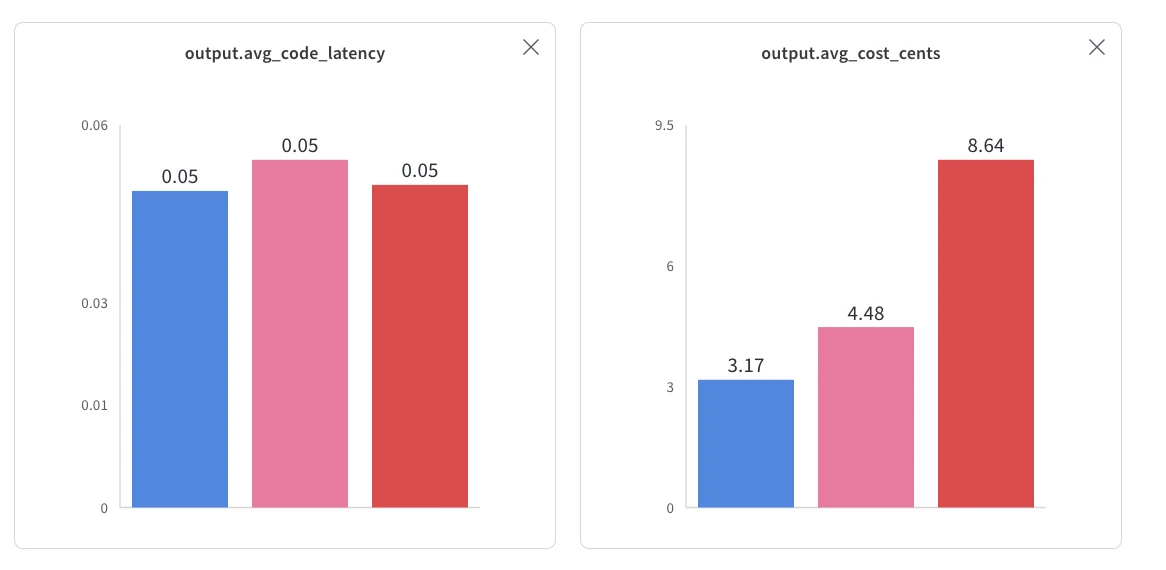
Across the 30 CodeContests tasks, none of the three models passed everything, so correctness is where the run separates them first. gpt-6-astra passed 97 percent of tasks and cost 4.48 cents per task on average. gpt-5.6-sol passed 90 percent at 3.17 cents per task, the cheapest of the three. claude-fable-5.1 passed 77 percent at 8.64 cents per task, close to double Astra's cost and close to three times Sol's. All three ran the generated code in about 0.05 seconds on average, so that latency number reflects how long the subprocess took to execute the code, not how long each model took to generate it.
Beyond the benchmark
Our CodeContests comparison covers a smaller part of that process, but the same cost question carries over. What matters is the total effort and spending needed to reach a result someone can use. Developers on X/Twitter are already testing Astra on games, 3D models, Blender scenes, and interactive environments, where success depends on code, visual quality, movement, and iteration. As models take on larger projects, benchmarks should measure the complete path from the first prompt to a working result, including the tokens, time, retries, and cost required along the way.