


Slurm Workload Manager explained for AI and HPC workloads
As modern workloads have grown more data-intensive and distributed, the Slurm Workload Manager (short for Simple Linux Utility for Resource Management) has become a cornerstone of large-scale computing. Originally created in the early 2000s to support large-scale high-performance computing (HPC) environments, Slurm is now widely recognized as the de facto scheduler for HPC clusters. Today, it orchestrates jobs across thousands of servers and GPUs in some of the world’s most advanced computing environments.
SchedMD, a software development company specializing in workload management and HPC scheduling, maintains Slurm with contributions from a global community of researchers and practitioners. Today, it is deployed on the majority of systems in the TOP500 supercomputer list, underscoring its role in mission-critical HPC environments worldwide.
Beyond its roots in academic and scientific research, Slurm now plays a central role in managing workloads in areas like artificial intelligence (AI), machine learning (ML), and GPU-accelerated computing. By handling resource allocation, queuing, and job execution across distributed infrastructure at scale, Slurm enables teams to run everything from scientific simulations to modern AI model training efficiently and predictably.
In this guide, we explain what Slurm is, how it works, how it compares to container orchestration platforms like Kubernetes, and why it remains a critical component for both traditional HPC environments and modern, GPU-powered AI infrastructure.
How the Slurm Workload Manager works
Slurm goes far beyond the capabilities of a typical operating system task manager, which only schedules processes on a single machine. It is designed to coordinate workloads across clusters of servers and GPU’s, from small research environments to the world’s largest supercomputing systems, ensuring that compute resources are shared efficiently among many users and jobs.
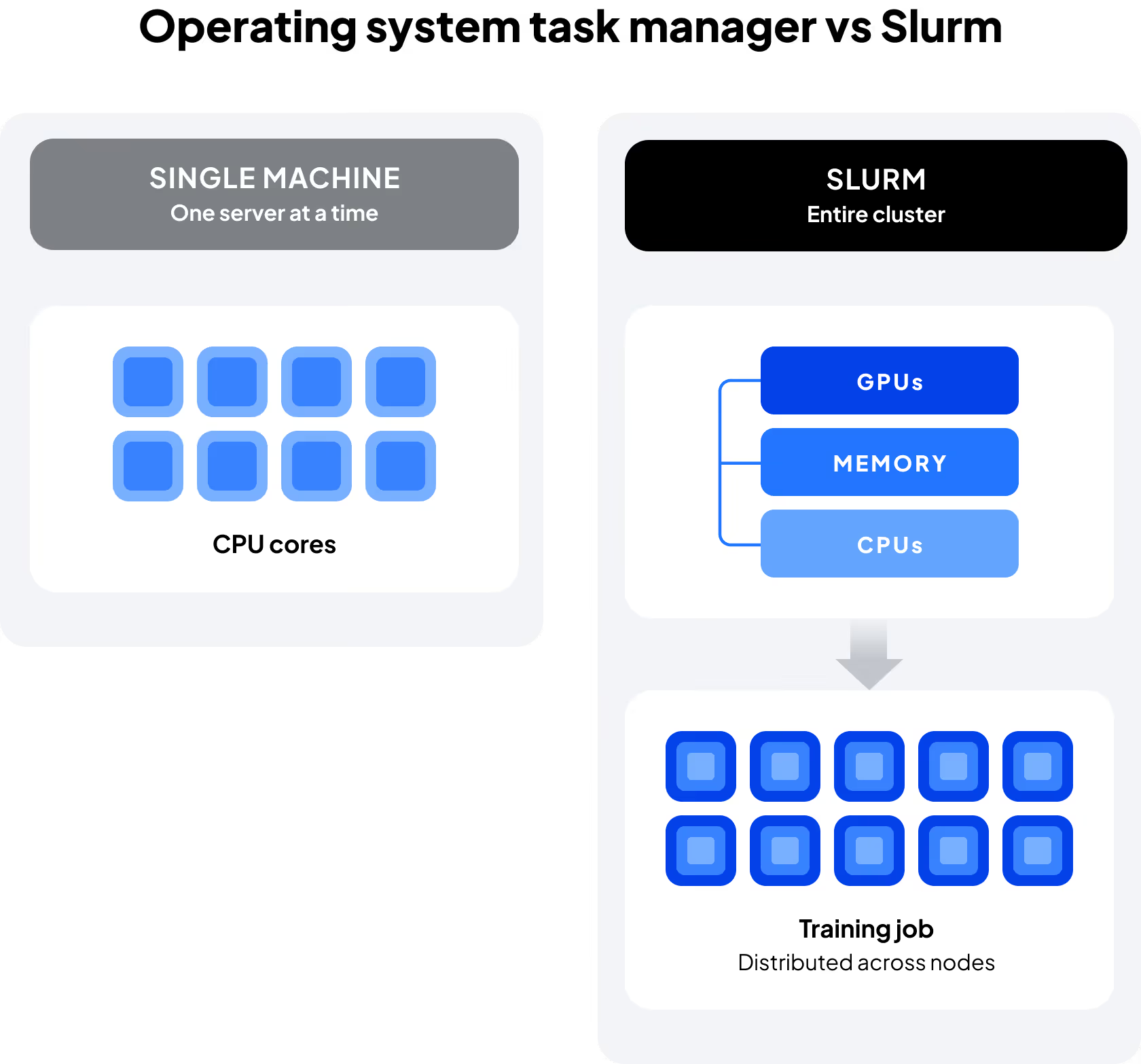
At its core, Slurm provides four primary functions:
- Schedules jobs and queues: Users submit jobs that are placed into queues, then scheduled according to policies and resource availability. This helps prevent bottlenecks when multiple training jobs or simulations compete for limited compute and GPU resources.
- Resource allocation: Slurm assigns CPUs, memory, GPUs, and nodes to jobs. In modern AI and ML workflows, this often means scheduling GPU-intensive workloads such as deep learning model training, multi-GPU simulations, or high-throughput inference to ensure GPU cycles are maximized.
- Enforces fair-share policies: Administrators can define quotas and priorities so resources are distributed equitably across users and projects. This is particularly valuable in multi-tenant environments where multiple research teams or business units share a common GPU cluster.
- Scales to any environment and workload: Slurm is built to handle everything from small clusters to the largest supercomputers. For AI teams, this scalability enables growth from a handful of GPUs to thousands, supporting distributed training and large-scale model development.
From a business perspective, Slurm operates as a framework for optimizing infrastructure utilization, ensuring costly GPU-accelerated hardware is used effectively. For practitioners, it provides a familiar, Linux-native workflow for submitting, monitoring, and managing jobs at scale—whether those jobs are traditional HPC simulations or modern AI training runs.
The Slurm scheduler and job lifecycle
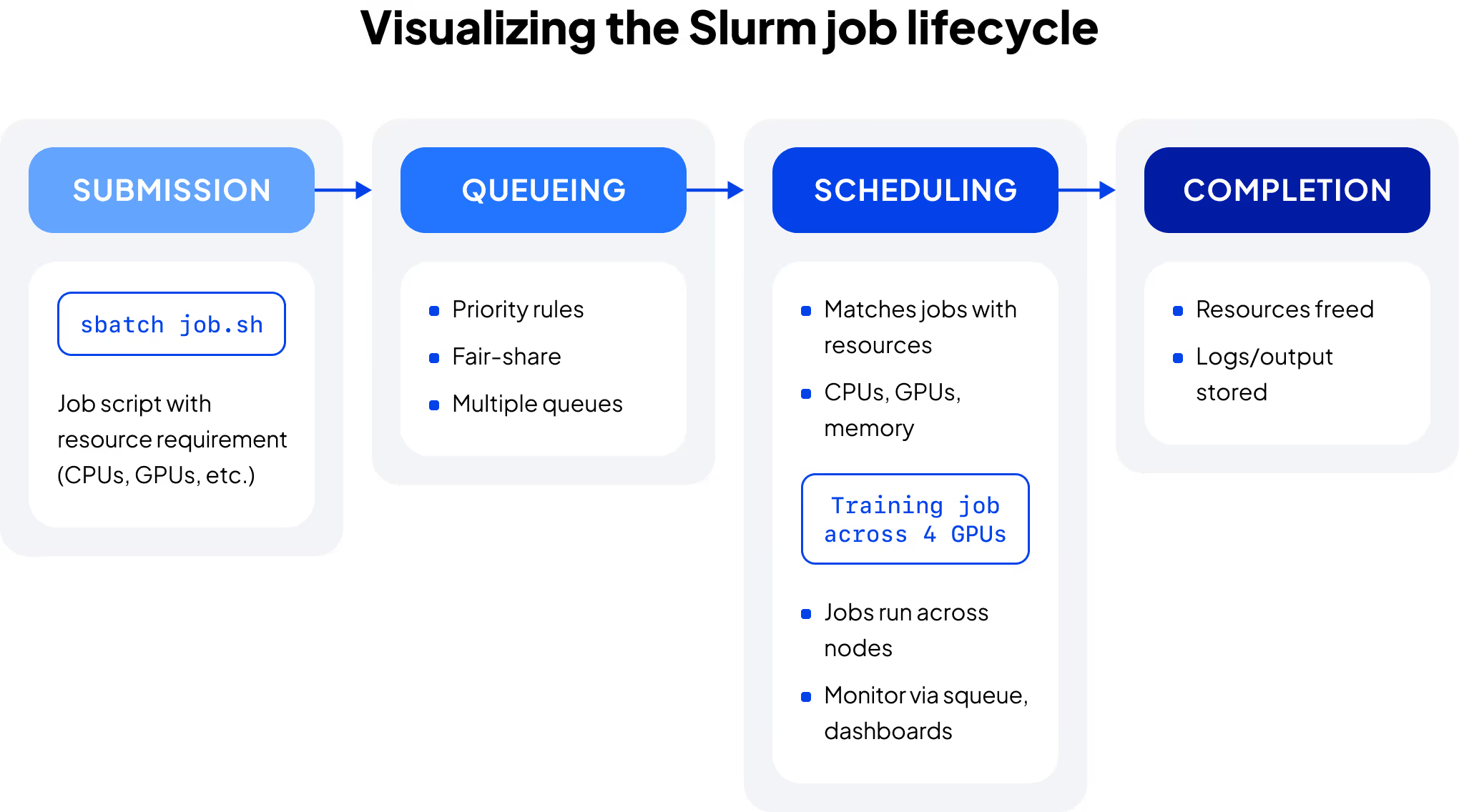
At its core, Slurm is a distributed scheduler: it determines when and where jobs run across a cluster of nodes. Jobs follow a defined lifecycle from submission to execution with Slurm ensuring that policies, priorities, and resource constraints are respected along the way. The typical job lifecycle includes:
- Submission: users submit jobs through command-line tools (such as sbatch), typically referencing a job script that specifies required resources, constraints, and execution parameters. For example:
sbatch job.sh
Slurm takes this request and places it into the job queue. In AI/ML contexts, the script may request multiple GPUs, define node constraints, and specify memory or time limits for distributed model training or large-scale simulations.
- Queueing: submitted jobs wait in one or more queues (often organized by partitions), where they are prioritized according to policies such as project quotas, fair-share rules, quality of service (QoS), or deadlines
- Scheduling: the Slurm scheduler evaluates available resources, such as CPUs, memory, GPUs, and nodes, and matches them to queued jobs based on defined policies and constraints; for multi-GPU AI workloads, this ensures that the required GPUs—along with supporting node and interconnect resources—are allocated cohesively to avoid fragmentation and performance degradation
- Execution: once resources are allocated, the job begins running on assigned nodes; users can monitor status, inspect logs, manage dependencies, and coordinate multi-step workflows across the cluster
- Completion: when a job finishes, resources are released back into the pool for other jobs; logs and outputs are saved for review, and results can feed into the next stage of an AI or HPC pipeline
This lifecycle allows Slurm to manage thousands of jobs at once, ensuring jobs are allocated efficiently and infrastructure is fully utilized, even when many users are sharing the same resources.
For many practitioners, the workflow also feels familiar and Linux-native. Users can submit and manage jobs directly from the command line without requiring containerization up front, lowering the barrier for researchers and engineers who want to move quickly from code to results.
In modern environments, Slurm is often paired with complementary tooling that enhances this lifecycle, adding observability dashboards, automated node management, or integration with containerized workflows when teams need them. For example, some advanced infrastructure providers run Slurm within Kubernetes to give administrators the benefits of automated lifecycle management while allowing end users to continue working in the Slurm environment they know.
Slurm vs. Kubernetes for AI and machine learning
While both Slurm and Kubernetes orchestrate compute resources, they were built for different goals. Slurm was designed to manage high-performance, batch-oriented workloads, while Kubernetes was created to orchestrate containerized, service-based applications. Their design origins still influence their primary use cases, although modern infrastructure increasingly integrates both models.
Here’s a quick overview of the key differences between the two systems.
Workload type
Slurm excels at running large, parallel, resource-intensive workloads—common in HPC, AI, and ML—where users need precise control over CPUs, GPUs, memory, and interconnects. Kubernetes, in contrast, is optimized for long-running or microservice workloads where container portability and scaling matter most.
Execution model
Slurm launches jobs directly on compute nodes using batch scripts and resource specifications, while Kubernetes deploys workloads inside containers using declarative manifests and controllers.
Scheduling focus
Slurm prioritizes throughput, queue fairness, and hardware efficiency across clusters. Kubernetes optimizes for elasticity, self-healing services, and multi-tenant environments.
User experience
Practitioners coming from research or engineering backgrounds often find Slurm intuitive since its command-line interface mirrors Linux workflows. Kubernetes offers powerful automation and observability but assumes teams are comfortable building and maintaining containerized applications.
Although they were conceived for different needs, some modern infrastructures, including CoreWeave’s, integrate both, running Slurm inside Kubernetes or alongside it. This approach gives users Slurm’s straightforward batch scheduling with the reliability, automation, and observability of Kubernetes.
Slurm and Kubernetes serve different orchestration needs: Slurm optimizes batch scheduling and hardware utilization for HPC and AI/ML, while Kubernetes manages containerized, service-based workloads.
Using Slurm for GPU workloads: benefits and limitations
As GPUs have become central to AI and high-performance computing (HPC), driving everything from large language models to complex scientific simulations, Slurm remains one of the most widely used tools for scheduling and managing GPU resources at scale. Its batch-oriented design allows teams to allocate GPU resources efficiently, ensuring workloads get the performance they need without leaving resources idle.
How Slurm handles GPU scheduling
Slurm provides fine-grained control over GPU allocation, allowing users to request specific numbers, types, and configurations of GPUs directly in their job scripts. It tracks GPU availability, ensures that only one job accesses a given device at a time, and coordinates shared memory, interconnect bandwidth, and node topology to minimize bottlenecks. For AI and ML workloads, this means Slurm supports efficient:
- Training of large models across multiple GPUs or nodes, maintaining synchronized data exchange
- Inference at scale, processing hundreds or thousands of predictions simultaneously
- Fine-tuning and experimentation, with flexible GPU partitioning and resource isolation
Because Slurm integrates GPU scheduling into its native resource management framework, teams can combine CPU, memory, and GPU requests seamlessly—without needing a separate orchestration layer for hardware assignment.
Key benefits
- Optimized resource utilization: Slurm’s scheduler ensures GPUs are kept busy, reducing idle time and maximizing ROI on high-cost hardware
- Elastic scaling: modern environments can scale clusters dynamically, adding or releasing GPU nodes automatically as workloads start and complete
- Visibility and observability: integrated dashboards and exporters allow teams to monitor GPU utilization, node health, and job performance in real time
- Flexible workload support: Slurm supports both containerized and non-containerized jobs, giving teams freedom to choose workflows that match their expertise and goals
- Identity and Access Management (IAM): advanced setups can federate user credentials and enforce permissions programmatically, streamlining onboarding while keeping GPU access secure and auditable
Common challenges
Despite its strengths, Slurm isn’t a universal fit or easy solution for every workload. Its effectiveness depends on available expertise and environment complexity.
- Configuration complexity: setting up and tuning Slurm for large GPU clusters can be complex, requiring specialized knowledge of hardware topology, scheduler policies, and cluster configuration
- Learning curve: teams accustomed to container-native orchestration models may find Slurm’s batch scripting and partition-based scheduling paradigm less intuitive initially
- Multi-cloud scaling: while Slurm supports multi-cluster federation, managing distributed environments can be more manual than with Kubernetes-native tools
Many organizations address these challenges by integrating Slurm with Kubernetes-based infrastructure, which provides automation and lifecycle management on the infrastructure layer while preserving Slurm’s strengths for GPU job scheduling.
Slurm in modern AI infrastructure
AI infrastructure has evolved beyond traditional HPC environments, where Slurm HPC clusters were the standard, into hybrid, GPU-accelerated systems that combine on-premises and cloud nodes and layer orchestration systems like Slurm and Kubernetes to balance flexibility, automation, and control. In this landscape, Slurm can play a critical role in managing large-scale, resource-intensive AI workloads, often as part of a broader ecosystem that includes containerization, observability, and identity management.
How the role of Slurm is evolving
In contemporary AI architectures, Slurm now runs on bare metal, in virtualized environments, and within Kubernetes, enabling teams to pair Slurm’s proven batch scheduling with the automation and elasticity of modern orchestration frameworks. Hybrid approaches allow administrators to automate node provisioning, monitor cluster utilization, and coordinate failure recovery across distributed environments.
Slurm best practices for modern AI environments
Automate provisioning and scaling where possible.
Many teams use infrastructure-as-code or orchestration frameworks such as Kubernetes to add or retire compute nodes dynamically as demand fluctuates. Advanced implementations can extend this automation further. For example, CoreWeave integrates Slurm with Kubernetes lifecycle management to automatically provision, drain, and replace nodes based on workload activity.
Monitor GPU and job utilization.
Combine Slurm’s built-in accounting data with open monitoring tools like Grafana or Prometheus to visualize performance, identify inefficiencies, and fine-tune scheduling policies. Some environments extend this with full-stack observability. CoreWeave, for example, provides metrics exporters and dashboards that correlate Slurm job data with underlying system performance.
Align scheduling policies with workload priorities.
Configure partitions, quality-of-service levels, and quotas to reflect project needs—balancing throughput with predictable access for AI training, inference, or research workloads.
Integrate with identity and access systems when practical.
Synchronizing users and permissions through existing IAM tools or directories streamlines onboarding and improves security. CoreWeave extends this through federated IAM and SCIM-based user synchronization, allowing identity updates to propagate automatically across Slurm clusters.
Adopt containerization strategically.
Teams can start with native Slurm jobs and gradually introduce containerized workflows for reproducibility and dependency management as their infrastructure matures.
Integration in practice
The complexity of large-scale AI training pipelines and distributed inference systems has led some teams to the use of Slurm within or alongside Kubernetes to balance automation and control. In CoreWeave’s Slurm on Kubernetes (SUNK) hybrid setup:
- Kubernetes manages node lifecycle, networking, and observability, automating how resources are provisioned, monitored, and replaced
- Slurm manages job scheduling, resource requests, and GPU allocation to ensure compute resources are distributed efficiently across workloads
Together, Slurm and Kubernetes can deliver the precision of batch scheduling with the scalability and resilience of container orchestration, a combination that supports the scale and complexity of modern AI workloads.




.webp)

